How to Use UTM Parameters: A Practical Guide for GA4
Nathan Hollis··10 min read
Most campaigns report to a channel called “direct / none.” That label is not a real answer. It means your analytics has no idea where the visit came from — because the link you sent was bare. Learning how to use UTM parameters fixes this completely, and it takes about ten minutes to set up properly.
I’ve helped dozens of teams get this right. The failures I see follow a predictable pattern: the parameters are there, but they’re inconsistent, case-jumbled, or tagged on the wrong links. This guide covers the full picture — what each parameter does, how to build them, where they show up in GA4, and the mistakes that quietly wreck your data.
UTM stands for Urchin Tracking Module. Urchin was the analytics software Google acquired in 2005 and turned into Google Analytics. The name is dated; the mechanism is essential.
UTM parameters are short key-value strings you append to any URL. When someone clicks a tagged link, those strings pass to your analytics tool as session-level attributes. Your tool stores them and lets you filter, segment, and compare traffic by source, channel, campaign, and more.
Everything from the ? onward is tracking data. The destination page works exactly as normal — the parameters are invisible to the visitor and have no effect on page behavior.
The Five UTM Parameters Explained
There are five standard parameters. Three are required by convention; two are optional but valuable once you’re tagging consistently.
Parameter
Required?
Answers
Example values
utm_source
Yes
Who sent the traffic?
newsletter, facebook, google, partner_techblog
utm_medium
Yes
What channel type?
email, social, cpc, affiliate, referral
utm_campaign
Yes
Which initiative or promotion?
spring_promo, product_launch, weekly_digest
utm_term
No
What keyword or audience?
analytics+tools, remarketing_30d, audience_smb
utm_content
No
Which creative or link variant?
header_cta, footer_link, carousel_v2
utm_source — the “who”
utm_source identifies the specific platform, publication, or sender. Think of it as a proper noun: linkedin, google, newsletter, partner_techblog. It should name the thing, not describe the category — that’s what utm_medium is for.
utm_medium — the “how”
utm_medium describes the marketing channel type. GA4 uses this value (along with source) to slot traffic into its default channel groupings. The values cpc, email, social, affiliate, and referral map directly to GA4’s built-in channel definitions. Deviate from those strings and your traffic may land in “Unassigned.”
utm_campaign — the “why”
utm_campaign ties the visit to a specific business initiative. It can be a promotion, a content series, a product launch, or a retention effort. This is the parameter you’ll filter on most often when asking “did this campaign work?”
utm_term — keyword or audience targeting
utm_term was designed for paid search keywords but works for any targeting dimension: audience segments, interest categories, retargeting windows. Most teams only use it for paid search, where it captures which keyword triggered the ad.
utm_content — creative differentiation
utm_content is essential for A/B testing and placement tracking. If you include two links to the same page in one email — one in the header and one in the body — utm_content=header_cta vs utm_content=body_link tells you which one actually gets clicked.
How to Use UTM Parameters: Step-by-Step
Here’s the practical workflow I follow for every campaign, from link construction through to reporting.
Step 1: Decide your values before you build
Before touching any tool, write down the source, medium, and campaign name. Check your existing naming vocabulary — if your team uses linkedin for organic LinkedIn posts, don’t invent linkedin_organic for this campaign. Consistency across campaigns is more important than any individual naming choice.
Step 2: Build the tagged URL
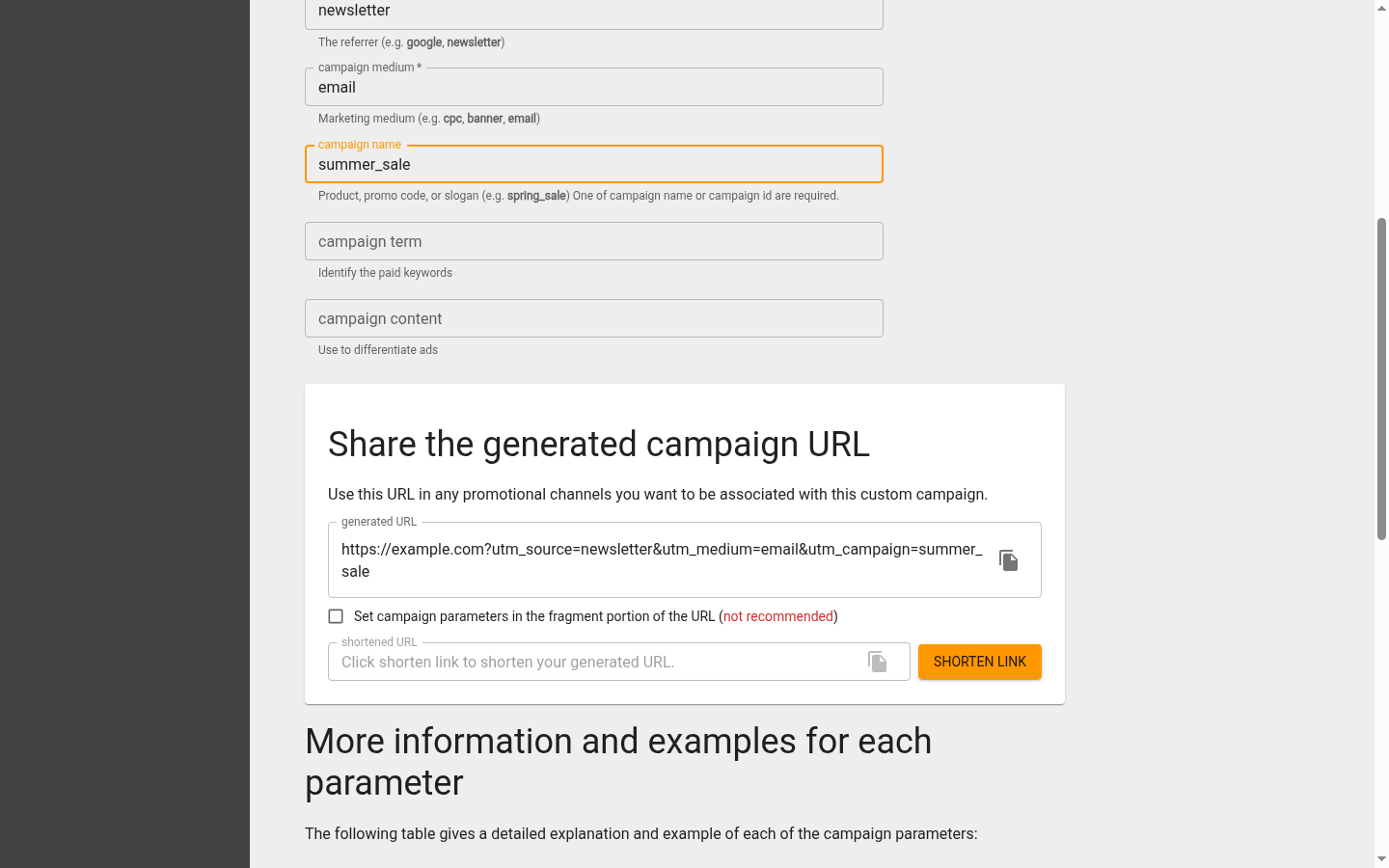
Use Google’s Campaign URL Builder for one-off links. It’s free, validates required fields, and copies the final URL cleanly. Paste your destination URL, fill in the three required fields, add optional ones if relevant, then copy the result.
Google’s free Campaign URL Builder. You fill in the source, medium, and campaign, and it builds the tagged link at the bottom — ready to copy and share.
For a newsletter link to a pricing page, the builder output would look like:
Paste the finished URL into a shared tracking spreadsheet before you use it anywhere. Record the destination, all parameter values, the campaign owner, and the date. When anomalous data appears in reports three months from now, this log is how you trace it.
Step 4: Test the link
Click it. Confirm the destination loads correctly. Open your GA4 DebugView (turn on debug mode via the GA4 debug configuration) and verify the session_source and session_medium parameters appear correctly. Catch typos before the campaign launches.
Step 5: Deploy and monitor
Send the email, publish the post, launch the ad. After 24 hours, check the Traffic Acquisition report in GA4 to confirm data is arriving under the expected source/medium combination.
Where UTM Data Shows Up in GA4
This is where the work pays off. GA4 surfaces UTM data in several places, but two reports are the ones you’ll live in.
Traffic Acquisition report
Go to Reports → Acquisition → Traffic Acquisition. By default this groups sessions by default channel grouping. Switch the primary dimension to “Session source / medium” or “Session campaign” to see your UTM values directly. This is your top-level view: which sources sent traffic, how many sessions, engagement rate, and conversions.
Session source / medium in secondary dimensions
In most GA4 reports you can add a secondary dimension. Adding “Session source / medium” to a pages report, for example, shows you which campaigns sent traffic to each page. Adding it to a conversions report shows which UTM source drove the most goal completions.
One important note: GA4 distinguishes between session attribution (which campaign started the session) and event attribution (which campaign is credited for the conversion, based on your attribution model). For most teams doing campaign analysis, session source/medium is the right dimension. If you need to understand how AI-generated referral traffic gets attributed — a growing concern — UTMs become even more critical because referrer headers from AI tools are often stripped or missing.
Naming Conventions: The One Thing That Makes or Breaks UTM Data
UTM parameter values are case-sensitive strings. GA4 treats Email and email as two different mediums. Your Traffic Acquisition report will fragment into newsletter / Email, newsletter / email, newsletter / EMAIL, and Newsletter / email — all representing the same channel. Months of data, useless.
These four rules eliminate that problem:
Lowercase only. No exceptions. utm_source=facebook not utm_source=Facebook.
Underscores or hyphens, never spaces. Spaces encode as %20 and make URLs ugly and error-prone. Pick one separator and stick to it across your team.
Maintain an approved vocabulary list. Document every permitted value for source, medium, and campaign format. If it’s not on the list, it doesn’t get used until it’s added. A Notion page or Google Doc works fine — the key is that it’s shared and referenced.
Use a UTM builder that enforces the list. Google’s Campaign URL Builder is sufficient for solo work. For teams, tools like UTM.io or a custom spreadsheet with dropdown validation prevent ad-hoc values from entering the system.
Your first-party data strategy only works if the inputs are clean. UTM naming consistency is the most basic form of data quality control.
Common UTM Mistakes and How to Avoid Them
Tagging internal links
This one corrupts data in a way that’s hard to detect later. If you put UTM parameters on links inside your own website — say, a blog post linking to your pricing page with utm_source=blog&utm_medium=internal — you override the original session source. A visitor who arrived from Google organic becomes attributed to “blog / internal” the moment they click that link. You’ve broken your attribution for that user’s entire session.
The rule is simple: UTMs are for external links only. Never tag links on your own domain.
Inconsistent casing across team members
One person writes utm_source=LinkedIn, another writes utm_source=linkedin, a third writes utm_source=linked_in. After six months you have four source variants for the same platform. The fix is documentation and enforcement — not just telling people, but using a shared builder with controlled inputs.
Missing required parameters
Using utm_campaign without utm_source and utm_medium creates partial data. GA4 may show the campaign name in one dimension but classify the session as “Unassigned” in channel groupings because it can’t determine the channel without medium. Always include all three required parameters together.
Campaign names that are unreadable in reports
Long, descriptive names feel thorough when you’re building them. In reports, utm_campaign=2026_q1_lead_gen_ebook_download_enterprise_marketers_version_2_ab_test is impossible to scan. Keep campaign names short enough to read at a glance: ebook_enterprise_q1 is sufficient.
Not tagging campaigns at all
The most expensive mistake. Untagged links from newsletters, social posts, and partner sites arrive as “direct / none” — entirely invisible in channel-level analysis. If you’re spending budget on email or social, and those sessions show up as direct, you cannot demonstrate ROI. Tag everything external.
UTM Parameters in Practice: Real Examples by Channel
These are the tagging patterns I actually use, tested against GA4’s default channel groupings.
Notice how each example uses consistent lowercase, underscores instead of spaces, and medium values that map to GA4’s built-in channel groupings. That mapping matters: GA4 uses your utm_medium value to determine whether a session goes into “Email,” “Organic Social,” “Paid Social,” or “Referral” in the Traffic Acquisition report.
UTM Parameters Explained: What Your GA4 Reports Actually Show
A common source of confusion is the difference between “Session source / medium” and “First user source / medium” in GA4.
Session source / medium — the source that started this specific session. If someone visited your site from Google last week (session 1) and returned via your newsletter today (session 2), session 2 is attributed to the newsletter, not Google.
First user source / medium — the source that acquired the user for the first time ever. The newsletter session above would still show Google as the first user source.
For campaign performance analysis, session source/medium is almost always the right dimension. You want to know which campaign drove sessions and conversions, not just which channel acquired each user originally. For broader acquisition strategy questions — which channels bring in new users who convert — first user source/medium is more relevant.
Your GA4 setup influences how cleanly this data appears. If you’re still working through the basics, the GA4 setup guide walks through the configuration steps that ensure UTM data is captured correctly from the start.
Quick Pre-Launch Checklist
Before any campaign goes live, run through this:
All external links are tagged (no bare URLs in the email or post)
All parameter values are lowercase
No spaces — underscores or hyphens only
Source, medium, and campaign are all present
Values match the approved vocabulary document
UTM strings are logged in the campaign tracking spreadsheet
At least one link has been clicked and verified in GA4 DebugView
No UTMs on any internal site links
The Bottom Line on Using UTM Parameters
Knowing how to use UTM parameters is one of the highest-leverage things you can do for campaign analytics. The technical barrier is low — the Campaign URL Builder does the construction for you. The real discipline is consistency: lowercase values, documented vocabulary, no internal tagging, and a log of every URL you send into the world.
Do that consistently for 60 days and you’ll have clean attribution data that actually answers the question “where did my traffic come from?” GA4’s Traffic Acquisition report will show you source/medium combinations that mean something, campaign names you recognize, and content variants you can compare. That’s the difference between a dashboard you ignore and one you make decisions from.
Start with the next email or social post you send. Tag it properly. Build the habit before you try to build the system. The Campaign URL Builder is one tab away. The GA4 platform records every tagged click automatically. There’s no infrastructure to set up. You just have to start.
First published . Last updated .
Nathan Hollis
Analytics tutor · GA4 & GTM
Web analytics consultant with 15+ years of experience helping businesses turn raw data into actionable insights. Former analytics lead at digital agencies across the US, now focused on privacy-first tracking strategies.


 Nathan Hollis
·
8 min read