A key event in Google Analytics is just an action you tell Google to count. You pick the few things on your site that matter most. Maybe it’s a sale. Maybe it’s a sign-up. You flip a switch, and from then on Google keeps a tally. That’s the whole idea.
Analytics tracks tons of stuff. Page loads, clicks, scrolls. Most of it is just noise. A key event is your way of saying, “this one is important.” It’s like starring an email in your inbox. The email still sits there with the rest. The star just tells you what to look at first.
So a key event doesn’t change what your site does. It only tells Google which results you care about, so it can count them for you.
A quick example
Say you run a small shop online. In one day, 500 people visit. They click around. They look at photos. They read reviews. That’s a lot of clicks to count.
But you really only care about one thing: did they buy? So you mark “purchase” as a key event. Now Google shows you a clean number. Maybe 12 people bought today. That number means more than all 500 visits combined.
What counts as a key event
A good key event is a real win for your business. Ask yourself one simple question: does this action lead to money or a new lead? If yes, mark it. If it’s just a visitor poking around, leave it alone.
Here are the kinds of wins most sites care about:
Someone buys something.
Someone signs up for a free trial.
Someone fills out your contact form.
Someone books a call or a demo.
Things like a scroll or a video play are nice to know. But they don’t pay the bills. So skip them as key events.
Don’t mark too many
Here’s the common trap. Every action feels important, so you mark all of them. Soon your list has fifteen “key” events. Now nothing stands out. The whole point was to spot the few that matter.
For most sites, three to five key events is plenty. Keep the list short. If everything is starred, nothing is.
What to do first
Before you touch any settings, answer one question. What action on your site brings in money or a real lead? Write it down. That’s your first key event.
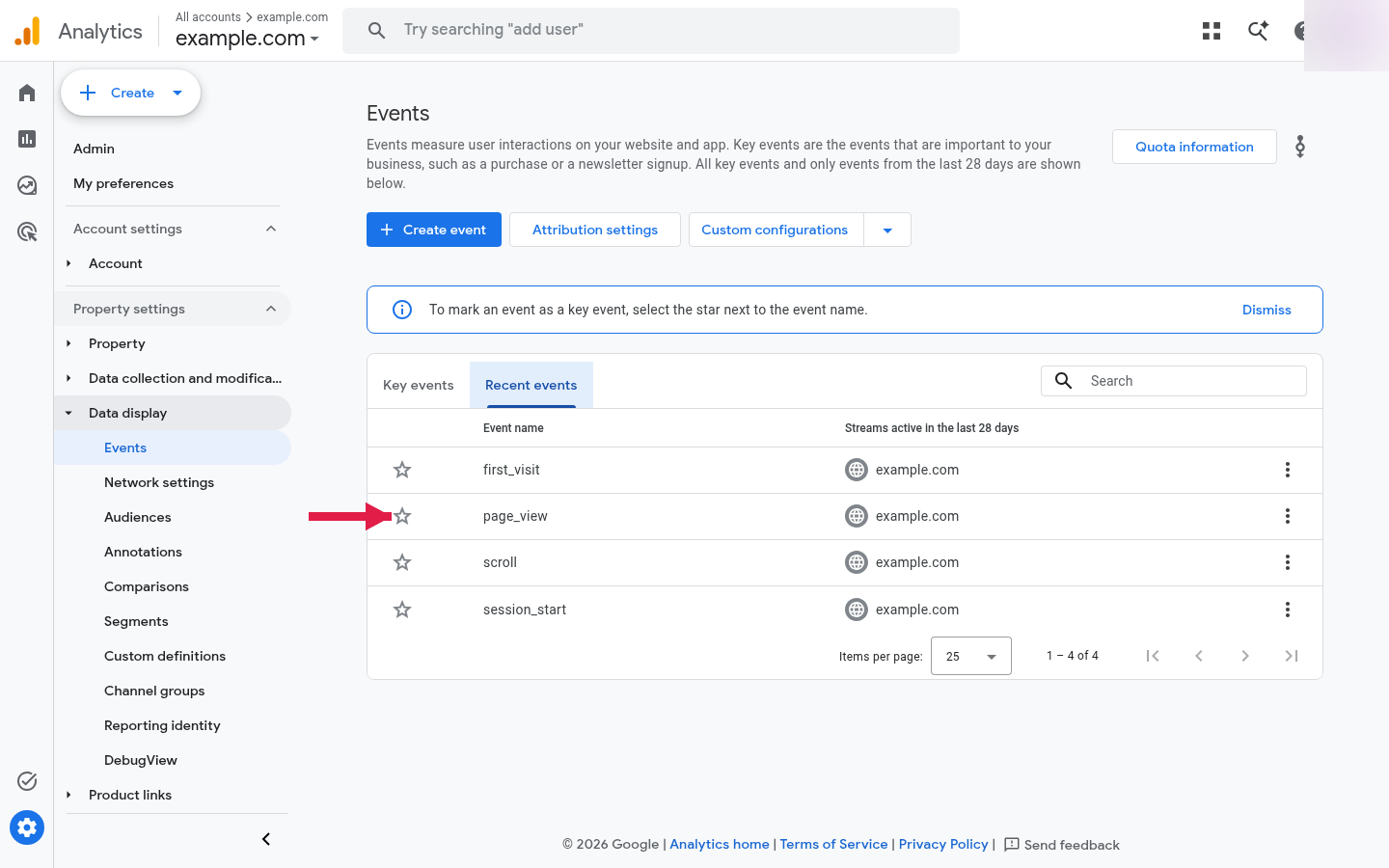
Then open your analytics, find that action in your list of events, and flip the switch to mark it. Start with one. You can always add another later.
In GA4, your events live under Admin → Events. The star on the left is the switch — click it next to the action that matters, and that event becomes a key event.
Nathan Hollis
Analytics tutor · GA4 & GTM
Web analytics consultant with 15+ years of experience helping businesses turn raw data into actionable insights. Google Analytics certified professional and former analytics lead at digital agencies across the US. Regular contributor to analytics industry publications and conference speaker on privacy-first tracking strategies.

 Nathan Hollis
·
2 min read
Nathan Hollis
·
2 min read