
You launch a campaign. Traffic increases. But where exactly did those visitors come from? Was it the LinkedIn post, the newsletter, or the influencer collaboration? Without proper tracking, you’re guessing.
UTM parameters solve this problem. They’re simple tags you add to URLs that tell your analytics exactly where each visitor originated. No guessing. No “direct/none” mysteries. Just clear, actionable data about what’s working.
This guide covers everything: what UTM parameters are, how to structure them consistently, common mistakes that corrupt your data, and a system for managing UTMs across your entire marketing operation.
What Are UTM Parameters?
UTM stands for “Urchin Tracking Module” — a relic from Urchin, the analytics software Google acquired and turned into Google Analytics. The name is outdated, but the technology remains essential.
UTM parameters are tags added to the end of a URL. When someone clicks that tagged link, the parameters pass information to your analytics tool about the traffic source.
A tagged URL looks like this:
https://example.com/landing-page?utm_source=newsletter&utm_medium=email&utm_campaign=spring_saleEverything after the ? contains tracking information. Your analytics tool reads these parameters and attributes the visit accordingly.
The Five UTM Parameters Explained
There are five standard UTM parameters. Three are essential; two are optional but useful.

utm_source (Required)
What it answers: Where did the traffic come from?
This identifies the specific platform, website, or sender. Think of it as the “who” — who sent this visitor to you?
Examples:
utm_source=googleutm_source=facebookutm_source=newsletterutm_source=partner_siteutm_source=linkedin
utm_medium (Required)
What it answers: What type of channel is this?
Medium categorizes the marketing channel at a higher level. It’s the “how” — how did they reach you?
Examples:
utm_medium=cpc(paid search)utm_medium=emailutm_medium=socialutm_medium=affiliateutm_medium=referralutm_medium=display
Important: Use consistent medium values. “Email,” “EMAIL,” and “e-mail” will appear as three different mediums in your reports. Pick one format and stick to it.
utm_campaign (Required)
What it answers: What specific initiative drove this traffic?
Campaign identifies the specific marketing effort, promotion, or content piece. It’s the “why” — why are you sending this traffic?
Examples:
utm_campaign=spring_sale_2026utm_campaign=product_launchutm_campaign=weekly_newsletter_jan26utm_campaign=brand_awarenessutm_campaign=retargeting_abandoned_cart
utm_term (Optional)
What it answers: What keyword or targeting triggered this?
Originally designed for paid search keywords, utm_term can track any targeting criteria: audience segments, interest categories, or specific keywords.
Examples:
utm_term=analytics+toolsutm_term=remarketing_30dayutm_term=audience_marketers
utm_content (Optional)
What it answers: Which specific element did they click?
When you have multiple links pointing to the same destination, utm_content differentiates them. Perfect for A/B testing or tracking specific placements.
Examples:
utm_content=header_ctautm_content=footer_linkutm_content=image_bannerutm_content=text_linkutm_content=variation_a
UTM Naming Conventions: The Foundation of Clean Data
UTM parameters are case-sensitive and unforgiving. Facebook, facebook, and FACEBOOK create three separate entries in your reports. Inconsistent naming turns your data into chaos.
Establish conventions before you start tagging:
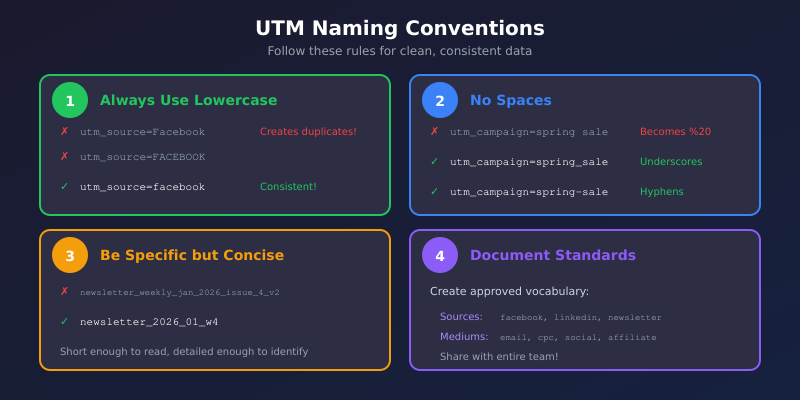
Rule 1: Always Use Lowercase
Pick lowercase and enforce it everywhere. Most analytics tools treat Email and email as different mediums. Lowercase eliminates this problem.
Do: utm_source=facebook
Don’t: utm_source=Facebook
Rule 2: Use Underscores or Hyphens, Not Spaces
Spaces in URLs get encoded as %20, making reports ugly and hard to read. Use underscores or hyphens instead.
Do: utm_campaign=spring_sale
Don’t: utm_campaign=spring sale
Rule 3: Be Specific but Concise
Names should be descriptive enough to understand months later, but short enough to work with. utm_campaign=email_newsletter_weekly_edition_january_2026_issue_4 is overkill.
Better: utm_campaign=newsletter_2026_01_w4
Rule 4: Create a Standard Vocabulary
Document approved values for each parameter. When everyone uses the same terms, data stays clean.
Example source vocabulary:
- Social platforms:
facebook,instagram,linkedin,twitter,tiktok - Search:
google,bing,duckduckgo - Email:
newsletter,drip,transactional - Partners:
partner_[name]
Example medium vocabulary:
cpc— paid searchcpm— display advertisingsocial— organic socialpaid_social— paid socialemail— all emailaffiliate— affiliate linksreferral— partner referrals
Common UTM Mistakes That Destroy Your Data
These errors are painfully common — and completely avoidable:
Mistake 1: Tagging Internal Links
Never use UTM parameters on links within your own website. When a visitor clicks from your blog to your pricing page with UTM tags, you override the original source. Suddenly “google/organic” becomes “blog/internal” — and you’ve lost attribution.
Rule: UTMs are for external traffic only.
Mistake 2: Inconsistent Capitalization
As mentioned, Email ≠ email. One team member uses “Facebook,” another uses “facebook,” a third uses “FB” — now you have three sources that should be one.
Solution: Document standards and use a UTM builder that enforces them.
Mistake 3: Missing Required Parameters
Using only utm_campaign without source and medium creates incomplete data. Most analytics tools need at least source and medium to properly categorize traffic.
Always include: utm_source, utm_medium, and utm_campaign together.
Mistake 4: Overly Complex Campaign Names
Names like utm_campaign=2026_q1_lead_gen_ebook_download_marketing_managers_version_2_test are impossible to analyze. Keep it readable.
Mistake 5: Not Tagging At All
The worst mistake is skipping UTMs entirely. Untagged links from emails, social posts, and campaigns show up as “direct” traffic — invisible and unattributable. If you can’t measure it, you can’t improve it.
UTM Templates by Channel
Here are ready-to-use templates for common marketing channels:
Email Marketing
?utm_source=newsletter&utm_medium=email&utm_campaign=[campaign_name]&utm_content=[link_location]Example:
?utm_source=newsletter&utm_medium=email&utm_campaign=weekly_digest_jan26&utm_content=header_ctaOrganic Social Media
?utm_source=[platform]&utm_medium=social&utm_campaign=[campaign_name]&utm_content=[post_type]Example:
?utm_source=linkedin&utm_medium=social&utm_campaign=thought_leadership&utm_content=article_sharePaid Social Ads
?utm_source=[platform]&utm_medium=paid_social&utm_campaign=[campaign_name]&utm_content=[ad_name]&utm_term=[audience]Example:
?utm_source=facebook&utm_medium=paid_social&utm_campaign=retargeting_jan26&utm_content=carousel_ad_v2&utm_term=website_visitors_30dInfluencer/Partner Links
?utm_source=partner_[name]&utm_medium=affiliate&utm_campaign=[campaign_name]Example:
?utm_source=partner_techblog&utm_medium=affiliate&utm_campaign=product_review_jan26QR Codes (Offline to Online)
?utm_source=qr_code&utm_medium=offline&utm_campaign=[campaign_name]&utm_content=[placement]Example:
?utm_source=qr_code&utm_medium=offline&utm_campaign=conference_booth_jan26&utm_content=brochureBuilding a UTM Management System
One person creating UTMs consistently is easy. An entire team doing it across months of campaigns? That requires systems.
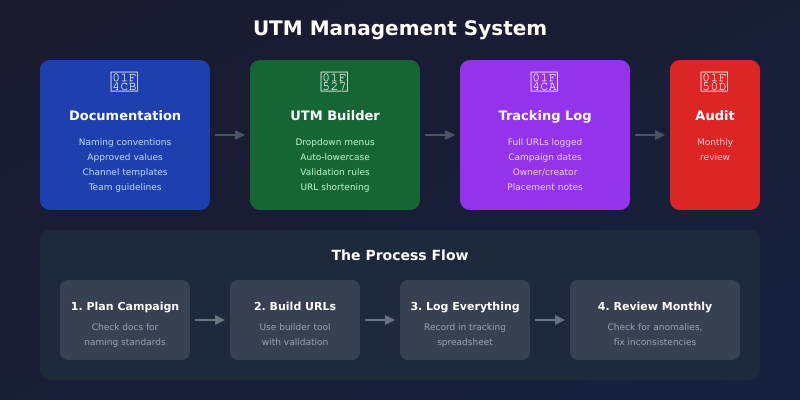
1. Create a UTM Documentation Hub
Document everything in one accessible place:
- Approved values for each parameter
- Naming conventions and rules
- Examples for each channel
- Who to contact with questions
A simple Notion page, Google Doc, or wiki works fine. The key is that everyone knows where to find it.
2. Use a UTM Builder Tool
Manual URL construction leads to errors. Use a builder that:
- Enforces lowercase
- Provides dropdown menus for standard values
- Validates required fields
- Generates shortened URLs if needed
Google’s free Campaign URL Builder works for individuals. For teams, consider tools like UTM.io, Terminus, or a custom spreadsheet with validation.
3. Maintain a Campaign Tracking Spreadsheet
Log every tagged URL with:
- Full tagged URL
- Short URL (if used)
- Campaign name and dates
- Owner/creator
- Where it was used
This creates an audit trail. When you see strange data in reports, you can trace it back to specific links.
4. Audit Regularly
Monthly, review your analytics for UTM anomalies:
- New source/medium combinations that shouldn’t exist
- Misspellings or capitalization variants
- Campaigns that weren’t logged
- Suspiciously high “direct” traffic after campaign launches
Catch errors early before they corrupt months of data.
Analyzing UTM Data in Your Analytics
Collecting UTM data is pointless if you don’t analyze it. Here’s how to extract insights:
Source/Medium Report
The most fundamental view. Group traffic by source/medium combination to see which channels drive results. Compare not just volume but quality — look at engagement metrics and conversion rates by channel.
Campaign Performance
Filter by campaign to see how specific initiatives performed. Did the spring sale campaign justify its budget? Which product launch drove the most qualified traffic?
Content Comparison
When you’ve used utm_content consistently, you can compare performance of different creative elements. Did the video thumbnail outperform the static image? Did the header CTA beat the footer link?
Connect to Conversions
The real value comes from connecting UTM data to business outcomes. Which sources drive conversions, not just visits? This requires proper conversion tracking in your analytics setup.
Quick Reference: UTM Checklist
Before launching any campaign, verify:
- ☐ All external links are tagged
- ☐ Using lowercase throughout
- ☐ No spaces (use underscores or hyphens)
- ☐ Source, medium, and campaign are all present
- ☐ Values match your documented vocabulary
- ☐ URLs are logged in tracking spreadsheet
- ☐ Links have been tested (click them!)
- ☐ No UTMs on internal site links
The Bottom Line
UTM parameters are simple in concept but powerful in practice. They transform vague “website traffic” into specific, actionable intelligence about what’s working in your marketing.
The keys to success:
- Tag everything external — emails, social posts, ads, partner links, QR codes
- Be consistent — lowercase, documented vocabulary, enforced standards
- Build systems — documentation, builders, tracking logs, regular audits
- Analyze the data — connect UTM insights to conversions and revenue
Start today. Tag your next campaign properly. In a month, you’ll have clear data showing exactly which efforts drove results — and which were wasted budget.
Stop guessing. Start measuring.