A UTM link is a normal link with a small tag added to the end. The tag tells your analytics where each visitor came from. So instead of a vague “direct” label, you see the real source. It takes one minute to make. Here is how it works.
Think of a plain link like a person walking into a shop. The shop owner sees them, but has no idea how they heard about the place. A UTM link is like a name tag on that visitor. It says, “I came from your email.” Now the owner knows.
The tag is just a bit of text added after the web address. The visitor never sees it. The page opens the same as always. But your analytics tool reads the tag and stores it.
What the tag looks like
Say your page is at example.com/sale. A normal link is just that. A UTM link adds a few words after a question mark, like this:
That extra bit means two things. The source is your newsletter. The way it reached people was email. You usually fill in three small parts. Here they are.
Source — who sent the traffic, like newsletter, facebook, or google.
Medium — the type of channel, like email, social, or ads.
Campaign — the reason, like spring_sale or new_product.
A tiny example
Imagine you send the same sale link two ways. One goes in your email. One goes in a Facebook post. You give each link its own tag.
A week later, your analytics shows 80 visits from the email link and 20 from the Facebook link. Now you know the email worked four times better. Without the tags, all 100 visits would blur together. You would learn nothing.
How to make one
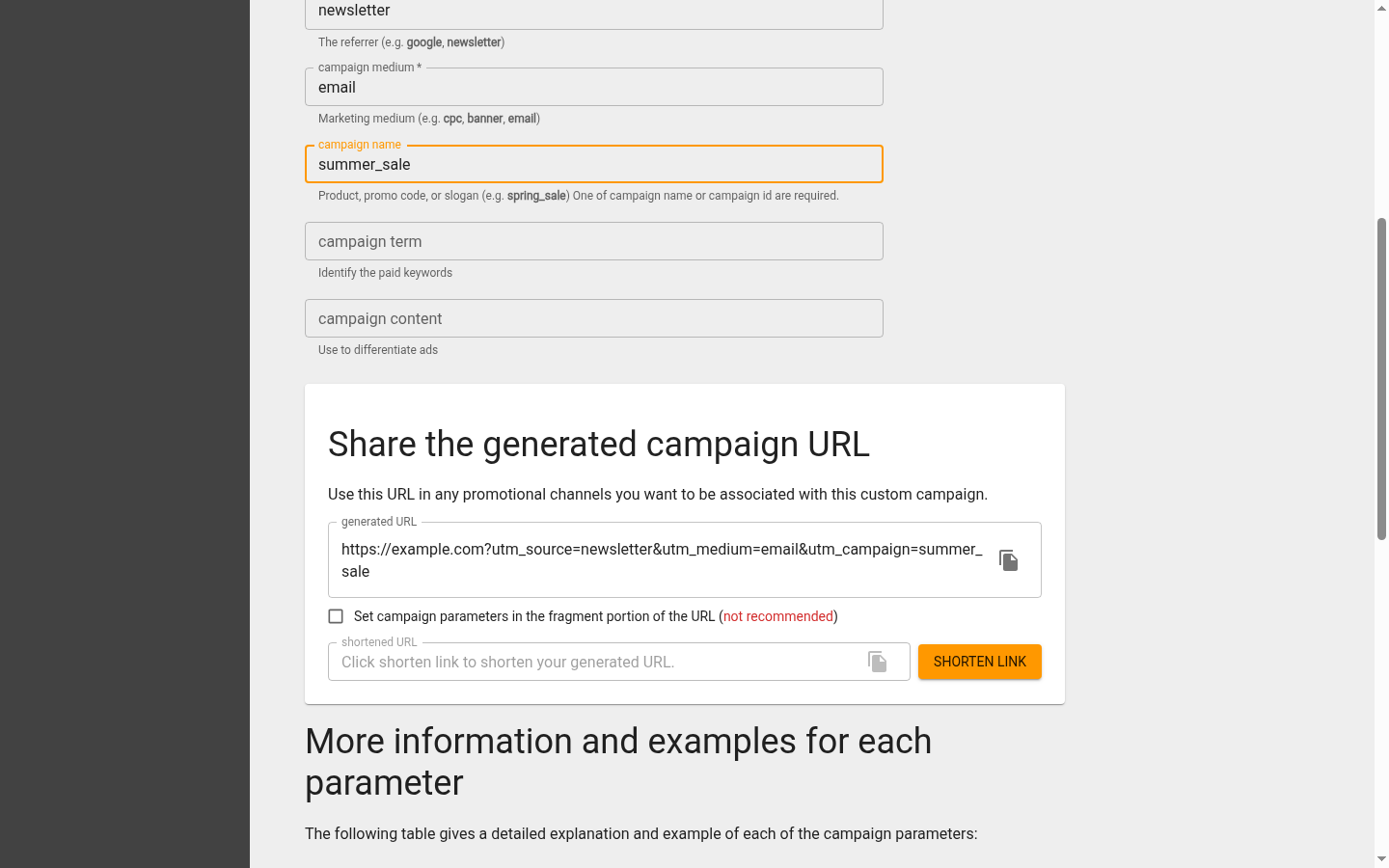
You do not type the tag by hand. Google has a free page called the Campaign URL Builder. You paste your web address, fill in the source, medium, and campaign, and it builds the full link for you. Then you copy it and use it.
Google’s free Campaign URL Builder. You fill in the source, medium, and campaign, and it builds the tagged link at the bottom — ready to copy and share.
One rule keeps your data clean: always use small letters. Your tool reads Email and email as two different things. So pick lowercase and stick with it every time.
Try it on the next link you share. Build a UTM link, send it out, and check your reports in a few days. You will finally see where your visitors really come from.
Nathan Hollis
Analytics tutor · GA4 & GTM
Web analytics consultant with 15+ years of experience helping businesses turn raw data into actionable insights. Google Analytics certified professional and former analytics lead at digital agencies across the US. Regular contributor to analytics industry publications and conference speaker on privacy-first tracking strategies.


 Nathan Hollis
·
2 min read
Nathan Hollis
·
2 min read