Cookieless Tracking: How It Works and Which Tools Support It
Nathan Hollis··8 min read
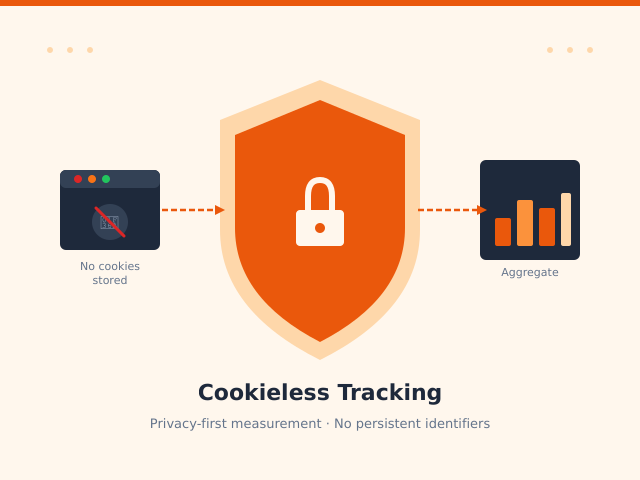
Most websites still send a small text file to every visitor’s browser and use it to recognise them on the next visit. That works — until a browser blocks it, a user clears their storage, or a regulator decides the whole mechanism requires explicit opt-in consent. Cookieless tracking is what happens instead: measuring site activity without writing any persistent identifier to the visitor’s device.
This article focuses on the technical mechanism — how it actually counts visitors, which tools implement it, and what you genuinely give up when you switch. If you want the broader privacy-first philosophy, I’ve covered that in my introduction to privacy analytics. If you’re weighing specific tools against each other, the Plausible vs Fathom vs Rybbit comparison goes deeper on features and pricing.
The phrase “cookieless” gets used loosely. Strictly, it means no persistent storage on the device — no first-party cookies, no localStorage, no IndexedDB, no fingerprint stored and recalled across sessions. The visitor leaves no trace on their own machine that the server can later retrieve.
That’s a meaningful constraint. Traditional analytics places a cookie like _ga=GA1.2.1234567890.1718000000 in the browser, then reads it back on every subsequent page load to stitch visits into a user journey. Remove that mechanism and you lose session continuity across page loads — unless you find another way to count unique visits without it.
It’s also worth correcting a common misconception here: Chrome has not blocked third-party cookies by default. Google reversed that plan in 2024. Firefox, Safari, and Brave do block third-party cookies by default. First-party cookies — the kind Google Analytics uses — still work in all major browsers. The urgency around cookieless tracking comes primarily from privacy regulation (GDPR, Schrems II) and the desire to avoid consent banners entirely, not from imminent browser-level blocking.
How Cookieless Tracking Works: The Core Mechanism
Without a persistent identifier, every page request looks identical to the server. Two visits from the same person an hour apart appear as two anonymous hits from the same IP range. So how do cookieless analytics tools produce unique visitor counts that are actually meaningful?
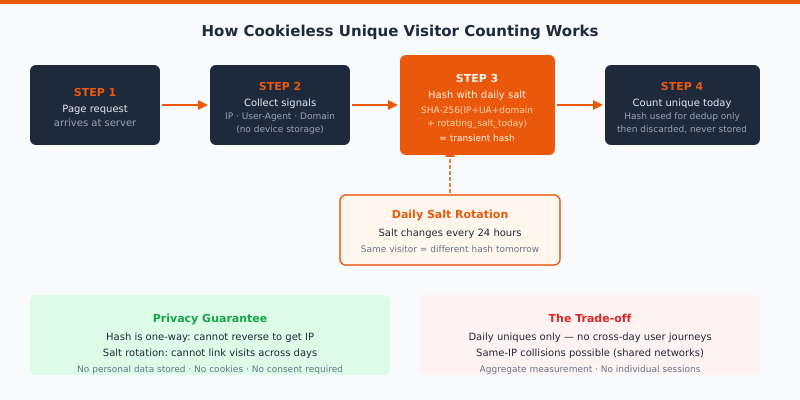
The answer is daily-rotating hash-based identification. Here’s the sequence:
When a page request arrives, the server (or edge function) collects a set of non-personal signals: the visitor’s IP address, the User-Agent string, and in some implementations the site’s domain.
Those signals are combined with a daily rotating salt — a secret string that changes every 24 hours — and run through a one-way hash function (typically SHA-256 or similar).
The resulting hash is used to count that visitor as unique for that day. No hash is stored beyond the current day’s aggregate count.
Tomorrow, the salt changes. The same IP + User-Agent produces a completely different hash. There is no way to link yesterday’s visitor to today’s.
The daily salt rotation is the privacy guarantee. Because hashing is one-directional and the salt is never exposed, you cannot reverse-engineer the original IP from the hash. And because the salt changes daily, you cannot correlate visitors across days — even if you had access to the raw hash values. The hash is used only to deduplicate within a single day’s count, then discarded.
Plausible describes this approach in their data policy: they never store IP addresses or any personal data; the hash exists transiently in memory for deduplication and is never persisted to disk.
Where Server-Side Collection Fits In
Some cookieless implementations go a step further and move data collection off the visitor’s browser entirely. Instead of a JavaScript snippet running client-side, the tracking happens at the server or edge layer — reading request headers directly, before the page even renders in the browser.
This matters for two reasons. First, ad blockers and browser privacy extensions target JavaScript-based beacons. A server-side or proxy-based collector never appears in the browser’s network tab and can’t be blocked by uBlock Origin. Second, the data is cleaner: no JavaScript errors, no single-page-app timing quirks, no browser inconsistencies in what gets sent.
Even when a tool does use a cookie — Matomo’s cookieless mode is the clearest example here — it operates in a strict first-party context. The cookie lives on your domain, set by your server. No third-party CDN, no cross-origin request to an analytics company’s servers.
This distinction matters legally. Under GDPR’s Recital 30, analytics cookies that are strictly necessary for the service you’re providing and that don’t allow tracking across multiple sites have been treated more leniently than third-party advertising cookies. When Matomo operates self-hosted with first-party data only, several European data protection authorities have ruled it usable without consent banners — though the specific conditions matter and legal guidance in your country should always be checked.
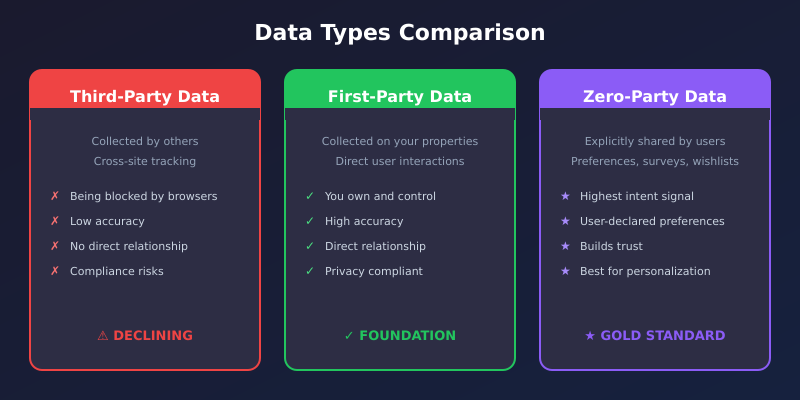
The broader principle: first-party data collected in a way that stays on your infrastructure is categorically different from data routed through a third-party analytics vendor’s servers. That’s the argument behind the first-party data strategy covered separately here.
Which Tools Support Cookieless Tracking
Three tools cover most of this space well. They use different mechanisms and that affects what you can actually measure.
Plausible Analytics
Plausible is cookieless by default and by design. There is no opt-out mode; no cookies, ever. They use the hash-and-daily-salt approach described above. Visitor identification is entirely server-side, transient, and never stored. The Plausible analytics approach means you get clean daily unique visitor counts but no cross-day user journeys.
The practical implication: if someone visits Monday and again Thursday, Plausible counts them as two separate visitors. That’s an honest trade for the privacy guarantee.
Fathom Analytics
Fathom is also cookieless by default. Their approach similarly avoids storing any persistent identifier. They use EU-isolated infrastructure and route data through a first-party proxy by default, which sidesteps most ad-blocker interference. Like Plausible, they count unique visitors per day using hashing-based deduplication, with no stored identifier. You can review their features at usefathom.com/features.
Matomo (Cookieless Mode)
Matomo is more flexible — and more complex. By default it uses a cookie for tracking, which gives richer session data. But Matomo offers a cookieless tracking mode that works similarly to Plausible: it disables cookie storage and measures sessions without any persistent identifier on the visitor’s device. Matomo documents the accuracy trade-offs of this approach in their FAQ on cookieless tracking. There’s also a mode where Matomo can operate without displaying cookie consent banners when configured for cookieless operation in specific jurisdictions.
Importantly, Matomo self-hosted keeps all data on your own server. Nothing goes to Matomo’s infrastructure. That’s the strongest data-sovereignty position of any of these options — and the most operationally demanding.
Method Comparison: How Each Tool Counts Uniques
Tool
Method for unique count
Cookie used?
Cross-day user journey?
Key trade-off
Plausible
Hash (IP + UA + domain + daily salt)
No
No
No persistent IDs; daily uniques only
Fathom
Hash-based, server-side deduplication
No
No
EU-isolated infra; no cross-session data
Matomo (cookieless mode)
Hash-based session identification
No (mode-dependent)
Limited (within session only)
More setup; self-hosted strongest option
GA4 (default)
Client ID cookie (_ga) + user ID
Yes (first-party)
Yes (up to 14 months)
Full journeys; requires consent in EU
GA4 + Consent Mode
Modeled/behavioral + pings
Conditional
Modeled estimates
Complex setup; Google-proprietary modeling
GA4 with Consent Mode is a related but distinct approach — it fills data gaps using statistical modeling when users decline cookies. I’ve covered that technical implementation in detail in the Google Consent Mode v2 guide, including how the consent API signals get interpreted by GA4’s modeling layer.
Honest Limits of Cookieless Analytics
I’d rather flag these plainly than bury them at the end. Cookieless tracking is genuinely useful, but it comes with real constraints.
No cross-session user journeys. You cannot see that a visitor read three blog posts over two weeks and then converted. Each day is a fresh count. This matters for e-commerce and content businesses that care about multi-touch attribution.
Unique visitor counts are approximations. Two people on the same office Wi-Fi sharing the same IP and similar browser configurations can look identical to the hash function and be counted as one. The daily salt prevents cross-day correlation but doesn’t solve same-day collisions.
Less granular cohort analysis. You can’t track returning visitors as a meaningful segment because there’s no concept of a “returning visitor” — only today’s unique hash, which tomorrow becomes someone different.
No user-level debugging. When you’re trying to diagnose why a specific user’s conversion funnel broke, you have no individual session to look at. You’re working with aggregates only.
These aren’t reasons not to use cookieless analytics. They’re reasons to match the tool to what you actually need to measure. For most content sites and small businesses, aggregate page views, unique daily visitors, referral sources, and top pages are entirely sufficient — and cookieless tools deliver all of that cleanly.
When Cookieless Tracking Is the Right Call
The clearest use case is any site that genuinely can’t or won’t run a consent banner. GDPR-regulated businesses in Germany, France, and the Netherlands face real legal risk from unconsented GA4 tracking — multiple data protection authorities have issued findings against it. Switching to a cookieless tool removes that exposure entirely because there’s no personal data being processed.
It’s also the pragmatic choice for sites where consent rates are low. If only 40% of your visitors accept cookies, you’re making decisions on 40% of your data. A cookieless tool that counts everyone without consent gives you a more complete picture of total traffic, even if individual-level detail is gone.
Consider it carefully for:
Content sites and blogs where page-level traffic data is more actionable than user journeys
EU-targeted sites where consent banner friction visibly affects bounce rate
SaaS free-tier landing pages where privacy credibility matters to your audience
Sites with technically-savvy visitors who use ad blockers (cookieless tools with server-side collection aren’t blocked)
Be more cautious for e-commerce stores that depend on multi-session attribution for paid campaigns, or any product where user-level session replay is needed for UX debugging. In those cases, cookieless-only measurement will leave meaningful gaps.
Bottom Line
Cookieless tracking solves a specific problem well: measuring aggregate site activity with no persistent identifiers, no consent requirement, and no cross-site tracking risk. The mechanism — hash-based daily deduplication with a rotating salt — is technically sound. It gives you meaningful unique visitor counts while making it cryptographically impossible to reverse-engineer or track individuals across sessions.
Plausible and Fathom implement this by default. Matomo offers it as a configuration option with the added benefit of full data ownership on your own server. None of these replace GA4 if you need deep funnel analysis or modeled cross-device journeys — but that’s the honest trade-off, not a bug in the approach.
If the broader picture of running analytics without third-party dependencies interests you, I’ve laid out a full first-party data strategy that goes beyond just the tracking layer.
Nathan Hollis
Analytics tutor · GA4 & GTM
Web analytics consultant with 15+ years of experience helping businesses turn raw data into actionable insights. Former analytics lead at digital agencies across the US, now focused on privacy-first tracking strategies.
 Nathan Hollis
·
10 min read
Nathan Hollis
·
10 min read