Plausible vs Fathom vs Rybbit: Privacy Analytics Comparison
Three privacy-first analytics tools are fighting for the same audience right now: Plausible, Fathom, and Rybbit. I’ve had…

The question comes up almost every time a client asks me about moving away from Google Analytics: “What about Matomo?” I’ve run Matomo Cloud next to GA4 for three different clients over the past two years, and the honest answer is that they’re solving different problems — but it’s not obvious which one is the right fit until you dig into the specifics.
This piece gives you the real picture on Matomo vs Google Analytics: what each tool actually does well, where each one falls short, and which type of site owner should pick which. No affiliate motivation here — just the comparison I wish I’d had before I started testing.

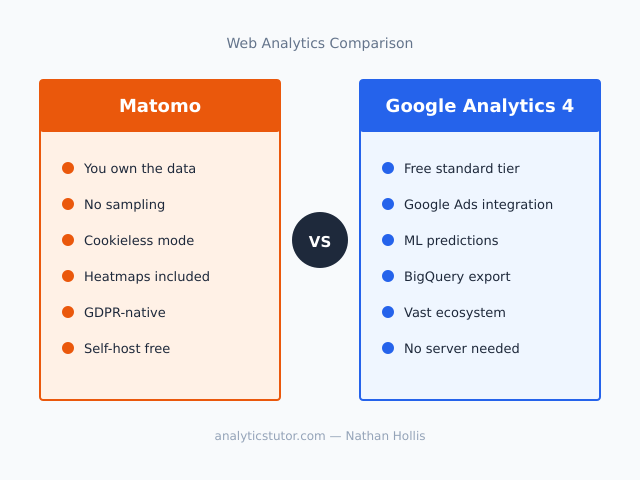
| Feature | Matomo | Google Analytics 4 (GA4) |
|---|---|---|
| Cost | Free (self-hosted) / from $26/mo (Cloud) | Free (standard) / GA4 360 from $50k/yr |
| Data ownership | You own 100% of raw data | Google processes and stores data |
| Data sampling | No sampling — ever | Sampling kicks in on large reports |
| Cookieless tracking | Yes (built-in option) | Partial (modeling only, not raw data) |
| GDPR compliance | Designed for it; EU-hosted Cloud option | Legally contested in several EU countries |
| Heatmaps & session recording | Yes (included in Cloud; plugin for self-hosted) | No (need a separate tool like Hotjar) |
| GA4 data import | Yes — official migration tool | N/A |
| Integrations ecosystem | Smaller (WooCommerce, Magento strong) | Vast (Google Ads, BigQuery, Looker Studio) |
| Self-hosting option | Yes (GPL, free) | No |
| Real-time reporting | Yes | Yes (with some latency) |
Matomo (formerly Piwik) is an open-source web analytics platform that’s been running since 2007. It’s built on the premise that you should own your data entirely — not just have access to reports, but hold the raw, unsampled event stream. The codebase is available on GitHub under the GPL license, which means you can self-host it for free on your own server. Alternatively, Matomo Cloud gives you a managed version hosted in the EU.
For most people reading this, the two versions behave identically from a reporting standpoint. The difference is operational: self-hosted means your IT person handles updates and server capacity; Matomo Cloud means you pay a monthly fee and get automatic updates, backups, and EU data residency out of the box.
Google Analytics 4 replaced Universal Analytics as Google’s primary free analytics product. It’s event-based (everything is an event, including pageviews), uses machine learning to fill in data gaps from consent refusals, and integrates tightly with the rest of Google’s ad and reporting ecosystem.
GA4 is free for the vast majority of sites. The paid tier — GA4 360 — starts at around $50,000 per year and is aimed at enterprises that need SLAs, higher data limits, and BigQuery streaming export at scale. Most people using GA4 are on the free tier.

When you use GA4, Google processes your visitors’ behavioral data on its own infrastructure. Google’s GA4 documentation makes clear that aggregated data is retained and used within the Google ecosystem. You get access to reports and exports — but you don’t hold the raw event stream unless you pay for BigQuery export and manage that pipeline yourself.
Matomo flips this entirely. Self-hosted Matomo means all event data lives in a MySQL database on your server. Nobody else can access it, subpoena it, change the data retention policy on you, or use it to train models. You export, delete, and control the data yourself.
In practice, this matters most for three types of organisations: those subject to strict EU data sovereignty requirements, those in regulated industries like healthcare or finance, and those who’ve had a client specifically ask “where does our visitor data go?” If none of those apply to you, GA4’s data processing model is probably fine.
The short answer is yes — but with important nuance. Several EU data protection authorities have found that standard GA4 implementations transfer data to US servers in ways that violate GDPR, because Google is subject to US surveillance laws. Austria, France, Italy, and Denmark have all issued rulings or guidance on this. That doesn’t mean you can’t use GA4 legally in the EU — but it requires deliberate configuration (IP anonymization, restricted data sharing settings, a valid DPA with Google), and even then some legal teams won’t sign off on it.
Matomo Cloud hosts data in Germany on servers not subject to US CLOUD Act jurisdiction. Self-hosted Matomo keeps data entirely within your chosen infrastructure. For EU businesses trying to navigate the EU vs US analytics compliance question, Matomo is the safer choice architecturally.
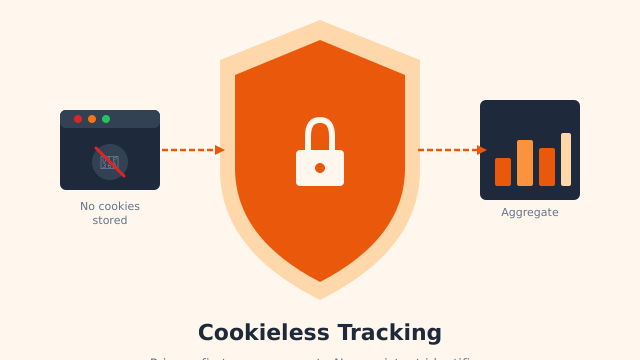
Additionally, Matomo’s cookieless mode is a genuine consent-free option. When you enable it, Matomo uses a first-party approach combining IP address, user agent, and a few other signals to distinguish sessions without setting any persistent identifier. You lose some attribution accuracy but gain the ability to operate without a consent banner in most EU jurisdictions. GA4’s consent mode and modeling is different — it still sets cookies for consenting users and estimates behavior for non-consenting ones, which doesn’t eliminate the consent requirement.
The feature set comparison is more interesting than most people expect. Matomo includes several tools that GA4 either doesn’t have natively or only provides in expensive add-ons.
Matomo Cloud includes heatmaps, click maps, scroll maps, and session recordings. For GA4 users, getting this data requires a separate tool — Microsoft Clarity (free but sends data to Microsoft) or Hotjar (free tier very limited, paid plans start at ~$49/month). Having behavioral data in the same platform as your traffic data is genuinely useful for conversion analysis.
This is a bigger deal than it sounds. GA4’s free tier applies sampling to some reports — particularly custom reports and comparisons over large date ranges. I’ve seen clients make decisions based on GA4 reports that showed 40% sampled data, without realising the numbers were approximations. Matomo’s exact counts are especially valuable for e-commerce revenue reporting and A/B test analysis, where you need precise figures.
Matomo’s form analytics plugin tracks field interactions, drop-off points, and conversion rates within individual forms. This is available in the free self-hosted version via the plugin marketplace. GA4 can track form submissions as events, but it doesn’t give you per-field analysis without custom development.
Matomo includes a built-in A/B testing module on Cloud plans. Setting up experiments in GA4 requires either Google Optimize (discontinued in September 2023, pushing users to third-party tools) or building server-side experiments manually with GA4 events. Matomo’s native A/B testing is simpler and keeps all your experiment data in one place.

This is where the honest picture gets more complicated. GA4’s standard tier is free for virtually all normal-sized websites. Matomo isn’t.
Matomo self-hosted is free under the GPL license. You need a server capable of running PHP 8.0+ and MySQL 5.5+, and someone to maintain it. For a typical small business, that means either running it on an existing hosting account (possible, but not ideal for performance) or provisioning a cheap VPS ($5–10/month from providers like DigitalOcean or Hetzner). Factor in time for updates and occasional troubleshooting.
Matomo Cloud pricing (verified June 2026 from matomo.org/pricing):
A “hit” in Matomo counts every tracked event — pageviews, custom events, downloads, outbound clicks. A site with 10,000 monthly visitors typically generates 20,000–50,000 hits depending on how many events you track per session.
For most small-to-medium sites, you’re looking at the $26–42/month range. That’s not expensive in absolute terms, but it’s a real cost compared to GA4’s $0. However, if you’re currently paying $49/month for Hotjar on top of free GA4, Matomo Cloud replaces both tools and likely costs less overall.
I’d be doing you a disservice if I didn’t flag where Matomo actually struggles, because some of these are significant depending on your use case.
Installing Matomo is straightforward. Keeping it updated, monitoring database growth (it accumulates a lot of data fast on busy sites), and dealing with the occasional PHP or MySQL version conflict is ongoing work. I’ve seen self-hosted Matomo installs fall months behind on security updates because the person who set it up left. If your team doesn’t have server-comfortable people, use Matomo Cloud or skip to a simpler tool.
If you rely on Google Ads auto-tagging, GA4’s native Ads integration, Salesforce connectors, or any number of SaaS marketing tools that natively support GA4 — Matomo’s integration library is thinner. It has solid WooCommerce, Magento, and WordPress integrations, but the long tail of marketing stack connections that GA4 has through Google’s partner program simply isn’t there.
Matomo’s interface is more powerful than GA4’s in some respects (the custom segmentation is excellent), but it’s also more cluttered. I’ve onboarded clients to both tools, and GA4 — despite its own famously confusing interface — tends to be easier for non-analysts to navigate for basic traffic questions.
GA4’s predictive audiences and behavioral modeling are genuinely useful for ad targeting — sending predicted “likely to purchase” segments to Google Ads is a feature Matomo doesn’t replicate. If your analytics primarily serves paid acquisition strategy, you’ll feel this absence.
For some sites, yes — unambiguously. For others, no. The answer depends almost entirely on your constraints and priorities.
Matomo is the better choice if:
GA4 is the better choice if:
There’s also a third path worth considering: for smaller sites that primarily want a simple privacy-respecting page view counter without the overhead of either platform, tools like Plausible or Fathom solve the problem more cleanly. I cover exactly that trade-off in the Plausible vs Fathom vs Rybbit comparison — worth reading alongside this one if you’re actively evaluating privacy-first options.
One practical consideration that comes up frequently: if you’re already running GA4 and considering a move to Matomo, you don’t have to lose your historical data. Matomo offers an official GA4 data import tool that migrates your existing GA4 reports into Matomo. The import covers sessions, pageviews, events, and goal completions. It’s not a perfect 1:1 migration (the data models differ), but it means you keep several years of trend data instead of starting from zero.
For sites that have been on Google Analytics for years and are nervous about losing their historical baselines, this migration path makes the switch significantly less risky. I’d recommend running both in parallel for 60–90 days before cutting over, to verify the numbers align closely enough for your reporting needs.
After two years of running both platforms side by side for clients, here’s where I’ve landed. If you’re a privacy-conscious EU business, Matomo isn’t just “nice to have” — it’s the defensible default. The legal landscape around GA4 in Europe continues to be murky, and Matomo’s architecture sidesteps the core problem. For a mid-size e-commerce site running Google Ads and optimizing toward ROAS targets, GA4’s native integration is hard to walk away from. For a content site or SaaS that primarily needs accurate traffic numbers and behavioral data without a heavy ad dependency, Matomo Cloud at $26–42/month replaces GA4 plus a separate behavior analytics tool and keeps your data on your terms.
If you’re already committed to keeping analytics simple and lightweight, also read the Plausible Analytics review — that tool sits between Matomo and GA4 in terms of feature depth and is worth a look before you commit to either.
The matomo vs google analytics question doesn’t have a universal answer, but it does have a right answer for your specific situation. The table above and the criteria in this piece should get you there.
Matomo is not simply a privacy-first version of Google Analytics — it’s a different product with different strengths. Its unsampled data, built-in heatmaps, genuine cookieless mode, and self-hosting option make it the better tool for data-sovereign organisations and exact-number-dependent use cases. GA4 remains the stronger choice when Google Ads integration, ML features, and a broad third-party ecosystem matter more than data control.
For most EU-based businesses asking me this question directly: the answer is probably Matomo, even with the Cloud cost, because the compliance overhead of getting GA4 right in Europe often exceeds the Matomo subscription fee. For US-based businesses running significant paid campaigns: stay on GA4 and use the budget for a proper privacy-first analytics strategy that doesn’t compromise your ad attribution.
Either way, the right call is the one that matches your actual data use case — not the one that minimizes friction on day one.